Every retirement plan starts with one question: how much will you spend each year? In Compass you can answer it two ways: type one number, or build an itemized budget. This guide explains both, what Compass assumes behind the scenes, and which one to use.
Key takeaways
- Compass can take your spending as one yearly number or as an itemized budget.
- Enter spending in today's prices and leave out income taxes and health insurance; Compass adds those and inflation for you.
- One number assumes the same spending every year, while an itemized budget lets costs start, stop or recur, like a mortgage ending or a car every 8 years.
- Flex mode spends what you prefer but drops to your needs when markets fall, which is how many retirees actually behave.
First, how Compass thinks about spending
Whichever way you enter it, Compass follows the same few rules:
- Enter today’s prices. If you spend $5,000 a month now, enter $5,000. Compass raises it with inflation every year for you.
- Enter what you spend, not what you pay in tax. Leave out income taxes and health insurance. Compass works those out and adds them on top.
- Your income pays first. Each year, Social Security (and any pension) covers what it can. Only the rest comes out of your savings.
- It tests 2,000 possible futures. Good markets, bad markets, and everything in between.
- “Success” means you never run short. A future counts as a success if your spending is paid every single year until the end of the plan. A success rate of 90% means that happened in 1,800 of the 2,000 futures.
Option 1: One yearly number
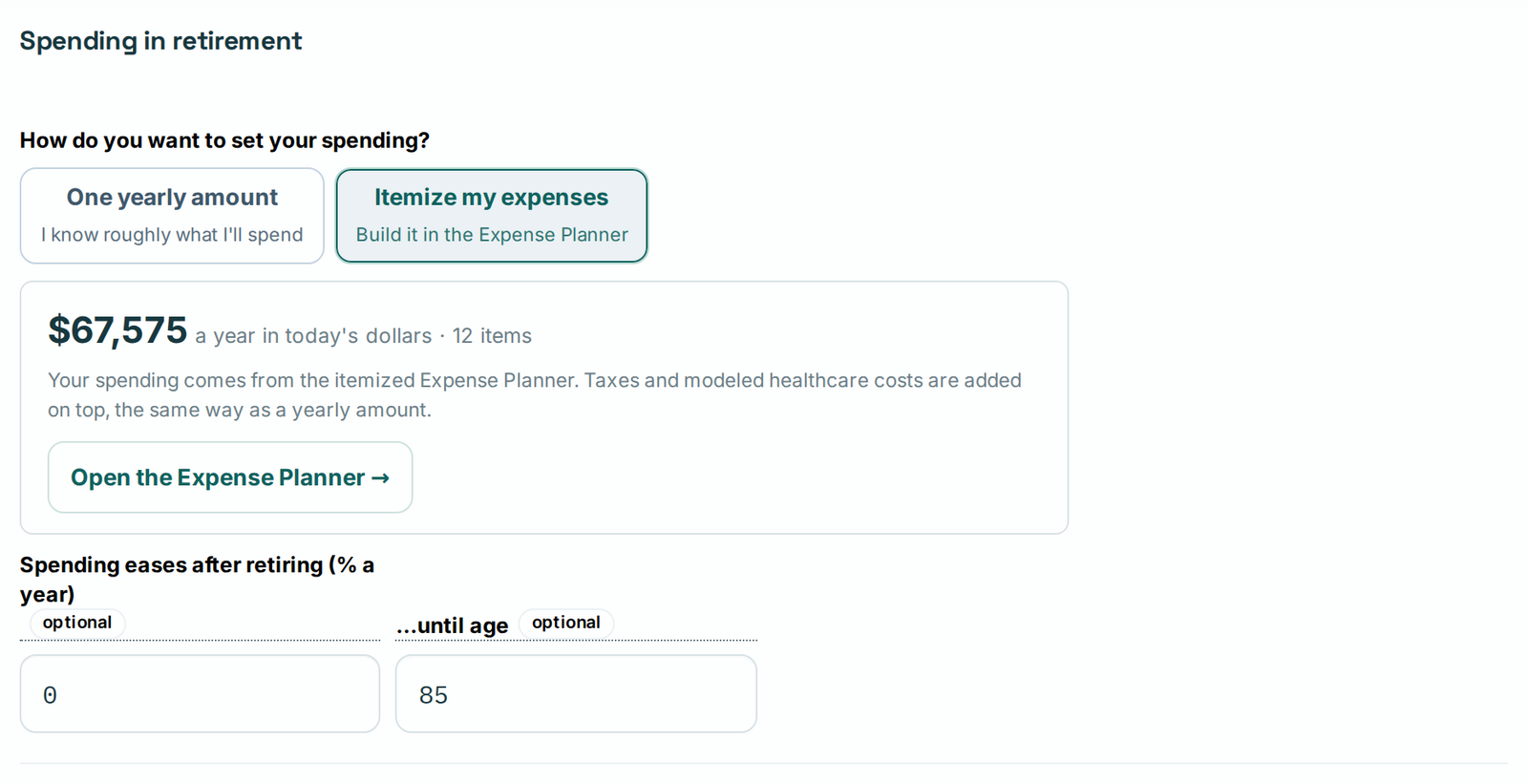
Go to Retirement details → Spending in retirement and choose One yearly amount. Type what you expect to spend in a year, for example $60,000.
Good for: a quick first look.
The catch: Compass assumes you spend that same amount (plus inflation) every year for the rest of your life. Real spending changes:
- The mortgage gets paid off, and that payment disappears.
- You replace the car every 8 years or so, a big bill all at once.
- You travel more in your 60s and less in your 80s.
Option 2: An itemized budget
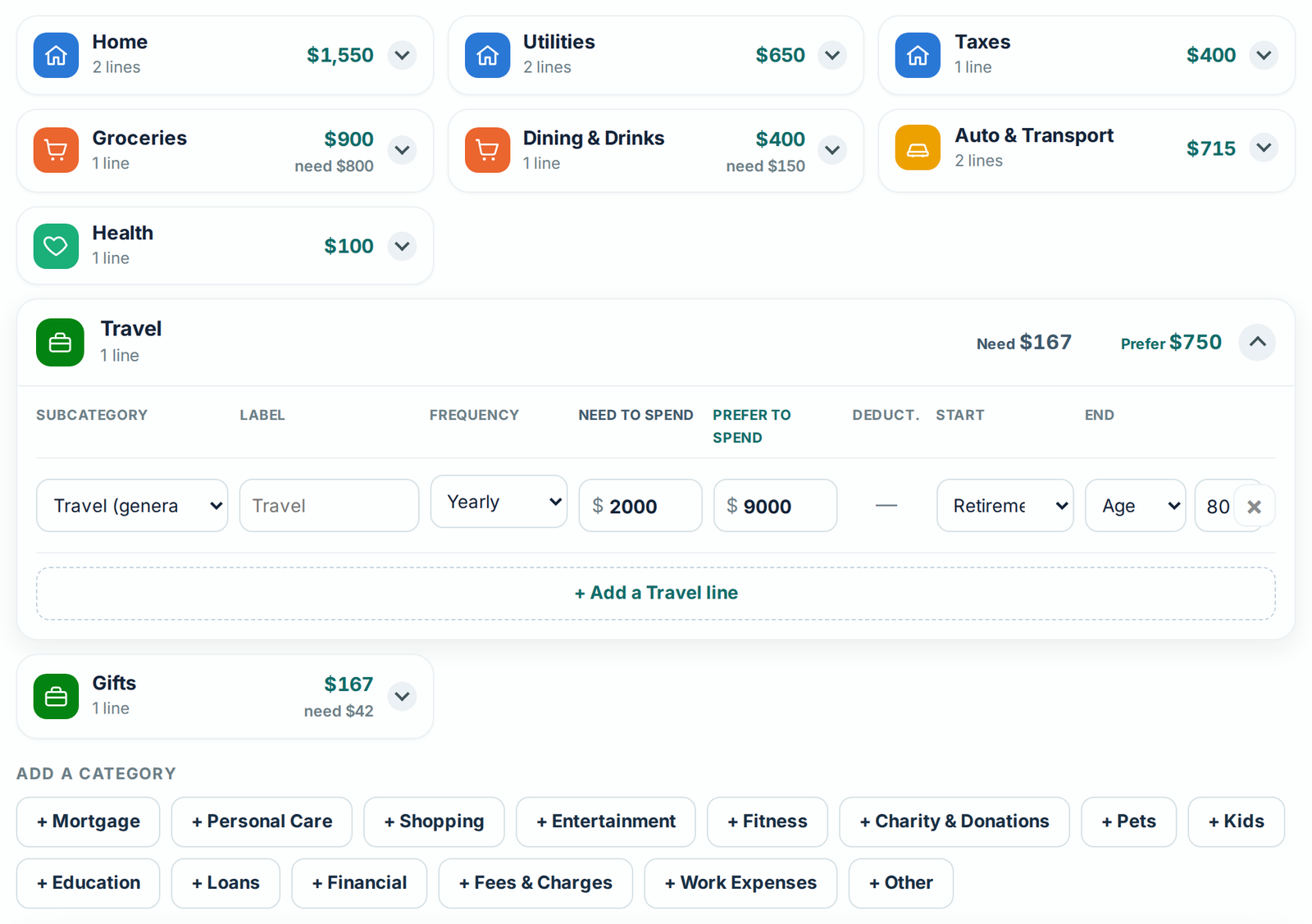
Choose Itemize my expenses instead, and Compass opens the Expense Planner. You list your costs one by one, and for each line you can say:
- How often: monthly, yearly, every few years (a car), or one time (a new roof).
- When it starts and stops: for example, the mortgage ends at 72 and big trips end at 80.
- Need vs. Prefer: the least you could live with, and what you’d like to spend.
Set it up in 5 steps
- Click Start with common expenses to get the usual lines, or import 12 months of spending from Quicken Simplifi.
- Fill in Prefer, the life you want.
- Lower Need on anything you could cut in a bad year, like dining out, travel or gifts.
- Add the big, occasional costs: a car every 8 years, a roof at 72.
- Set end ages: mortgage at 72, heavy travel at 80. (Use + Mortgage and Compass works out the payoff year for you.)
Prefer, Need or Flex
At the top of the Expense Planner, you tell Compass which amounts to test:
- Prefer: can I afford the life I want?
- Need: worst case, can I cover the basics?
- Flex: spend Prefer, but tighten to Need when markets are down (investments 20% or more below their high), then go back to Prefer when they recover. This is how most retirees really behave.

Example: the same person, both ways
Pat (a made-up example) is 62 and retiring at 65, with $1.1 million in a 401(k), $40,000 in savings and $2,800 a month of Social Security at 67.
Pat’s itemized budget comes to about $63,000 a year at 65, plus a $35,000 car every 8 years. The mortgage ($1,400 a month) ends at 72, and travel ($9,000 a year) ends at 80. In today’s dollars, leaving the car aside, Pat spends:
| Ages | Spending a year | Why it changes |
|---|---|---|
| 65–71 | $63,000 | Mortgage and travel |
| 72–79 | $46,000 | Mortgage paid off |
| 80+ | $37,000 | Travel winds down |
If Pat had typed a single number, $60,000 would have looked about right. Here’s what Compass found:
| How Pat entered spending | Chance of success |
|---|---|
| One number: $60,000 a year | 80% |
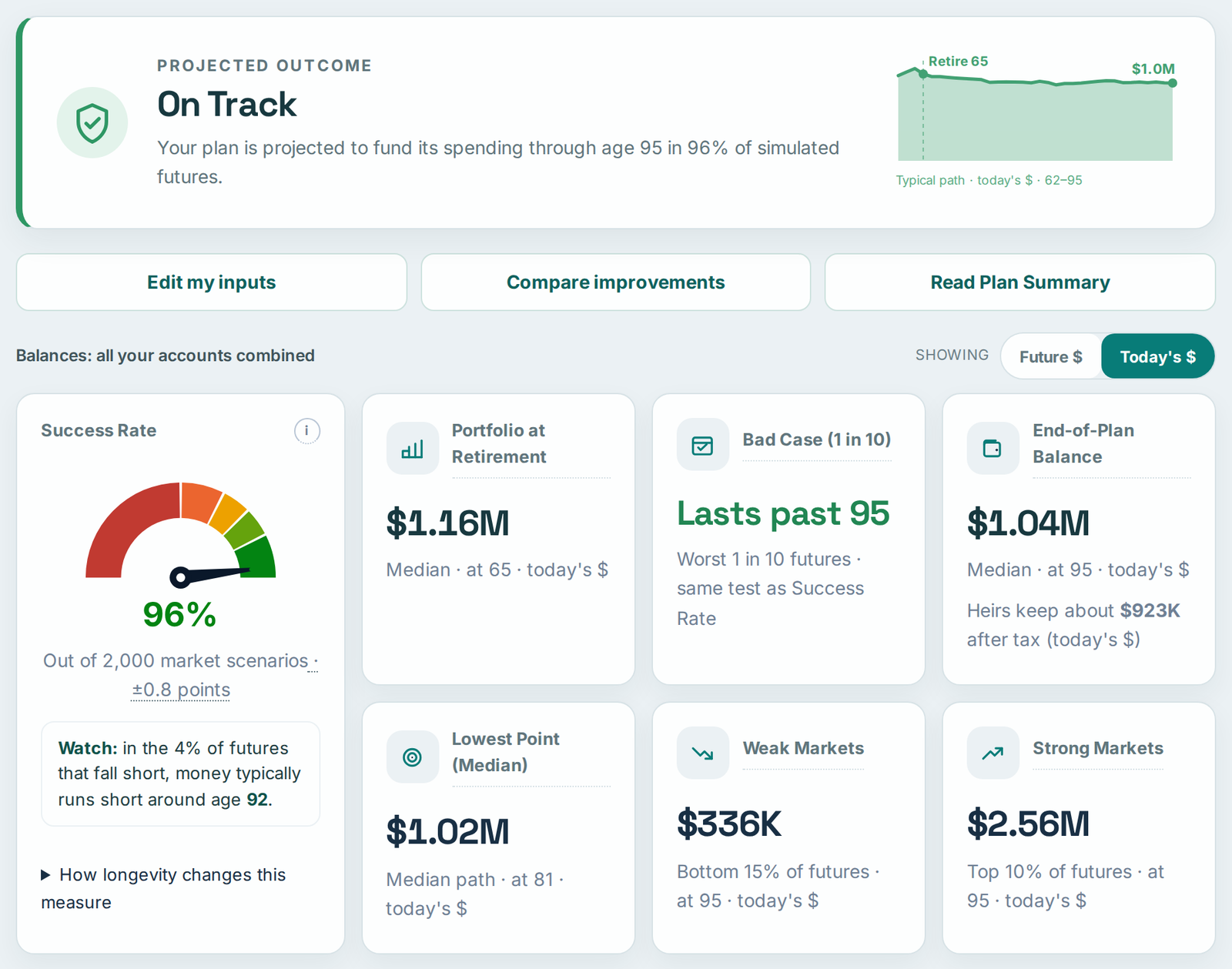
| Itemized budget (Prefer) | 96% |
| Itemized budget (Flex) | 98% |
| Itemized budget (Need only) | nearly 100% |
Why the budget scores higher: the single number assumed Pat spends $60,000 for 30 years. The budget shows that spending drops after 72 and again after 80, so over a lifetime Pat actually needs less. Nothing about Pat’s life changed. The plan just got more accurate.
How your budget works with your withdrawal method
Your budget is what you want to spend. Your withdrawal method is the rule for how much to take out of your savings. Compass offers three:
| Method | How it works | Best for |
|---|---|---|
| Steady amount (Annual Spending Goal) | Takes out exactly what your budget needs, every year. | People who want a predictable paycheck. |
| Withdrawal Rate | Takes a fixed share of your savings each year, for example 4%. More after good years, less after bad ones. | People who want withdrawals to follow the markets. |
| Guardrails | Starts at a set rate (like 5%). If your savings fall a lot, it trims withdrawals by 10%. If they grow a lot, it raises them by 10%. | People who want a bit more income and can live with small adjustments. |
When the rule and your budget don’t match
With Withdrawal Rate or Guardrails, the rule decides how much comes out of your savings, so some years it pays more than your budget and some years less. Compass handles both the way a sensible retiree would:
- The rule pays more than you need: you still spend your budget, and the extra is put aside in savings for later.
- The rule pays less than you need (say, the year you buy a car): the difference comes from your cash first, then your other investments, then your 401(k) or IRA, with tax added. You only “run short” if all of your savings are gone.
Pat’s itemized budget under each method:
| Withdrawal method | Chance of success |
|---|---|
| Steady amount | 96% |
| Guardrails, starting at 5% | 97% |
| Withdrawal Rate, 4% | 97% |
All three work for Pat. The difference is how it feels: the steady amount gives the same paycheck every year, while the other two save more in good years and dip into savings in lean ones. Compass’s Guardrails in Action chart shows exactly when Guardrails would trim or raise your spending.
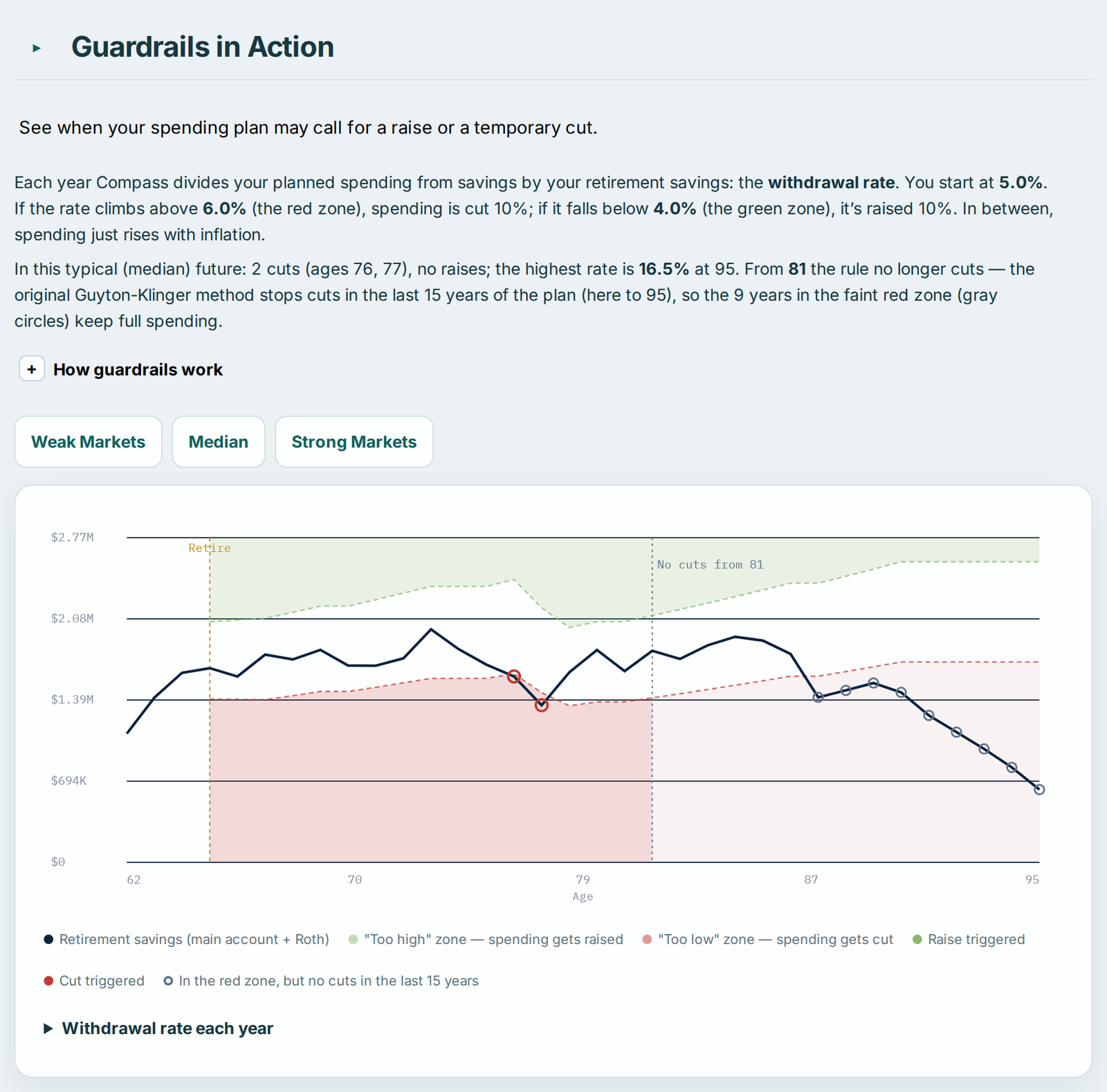
All results are from Compass with the inputs above. Your numbers will differ. This is an illustration, not a forecast.
Which should you use?
- Just exploring? Use one number.
- Have a mortgage, car loan or big trips planned? Use the itemized budget.
- Could cut back in a bad year? Itemize and choose Flex.
- Want to know your bare minimum? Itemize and choose Need.
A simple routine: run one number first. Then build your budget and compare. The gap between the two tells you how much your plan depends on spending changing over time.
Common mistakes
- Including taxes or health insurance. Compass adds those, so including them counts them twice.
- Forgetting the mortgage end date. It’s often the biggest drop in retirement spending.
- Spreading the car over every month. Use “every 8 years” so the plan sees the real bill.
- Making Need the same as Prefer everywhere. Then Flex has nothing to flex.
Try it with your own numbers
Compass is free, needs no sign-up, and keeps your plan in your own browser.
RetireNerd and Compass provide education and planning tools, not financial, tax or legal advice. The example is hypothetical. Results are simulations based on assumptions about future returns, inflation and taxes, and real outcomes will differ.